Package Types🔗
Beginner
This article is in the Components topic. It generalizes two shapes from earlier articles: the MCP9700A's TO-92 shape from Temperature Sensors and the resistor bodies from Resistor Color Codes.
A small transistor and the MCP9700A temperature sensor do completely different jobs, yet in a parts bin they're hard to tell apart: the same black, three-legged half-cylinder. What a component does and what it looks like are separate design decisions, and the second one, its package, is standardized across thousands of unrelated parts.
This article covers the handful of package families that account for almost everything you'll meet, and the one distinction that matters most on a beginner's bench: whether a part plugs into a breadboard at all.
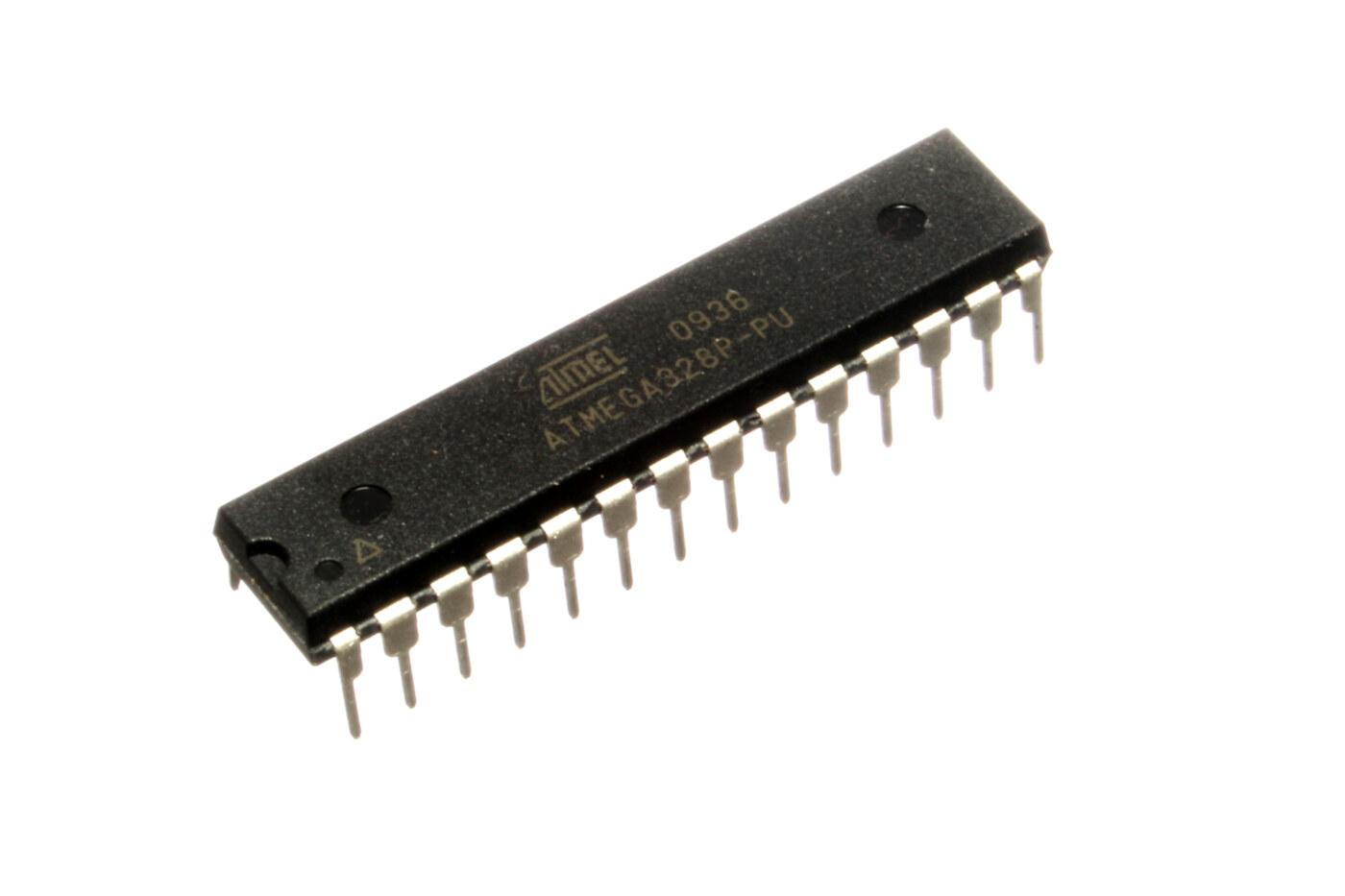
ATmega328P, the microcontroller at the heart of the Arduino Uno, in a DIP package: a black rectangular body with two rows of legs. Photo: oomlout, CC BY-SA 2.0.
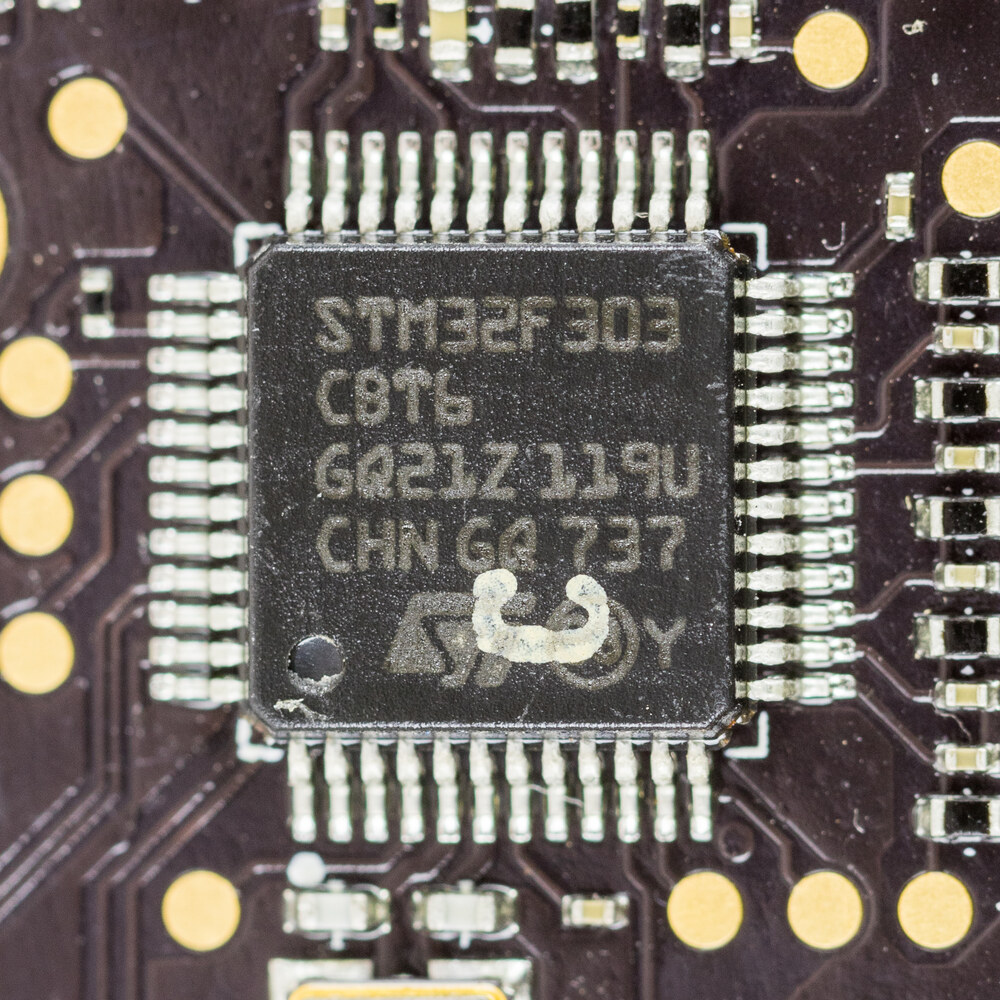
STM32F303: a different microcontroller doing the same job, in an LQFP package. Chips like this rarely turn up loose in a parts bin; they're placed by machine and usually photographed where they live, soldered down. Photo: Raimond Spekking, CC BY-SA 4.0.
Same job, two completely different packages. Neither photo shows what the part does; each shows how it's built and how it connects to a board, which is exactly what a package describes.
Two Families🔗
Every package falls into one of two families, and the difference is entirely about how the part physically attaches to a board.
Through-hole parts have long metal legs meant to pass all the way through holes in a circuit board (or a breadboard's holes) and get soldered on the other side, or, on a breadboard, held by the board's internal spring clips. Every part used hands-on anywhere on this site so far has been through-hole, for exactly one reason: it's the only family a breadboard can hold.
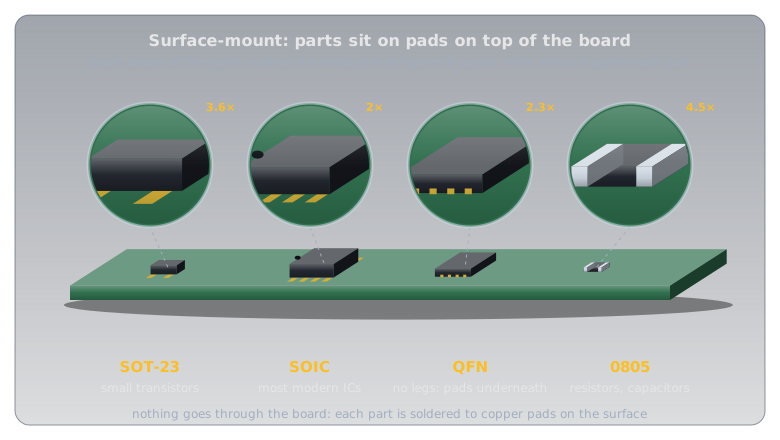
Surface-mount device (SMD) parts have short metal legs, or no legs at all, just flat metal pads, and sit on top of a board, soldered to pads on its surface. They're smaller, cheaper to produce in volume, and what almost all modern commercial electronics actually use. They are also, deliberately, absent from every project on this site: a breadboard has nothing for a flat pad to grip.
The ATmega328P at the top of this article happens to be DIP, but the same chip, running the same code, also ships in a surface-mount TQFP package: it's what's inside an Arduino Nano. Package and function are independent choices, and nothing proves it faster than one chip sold in both families:
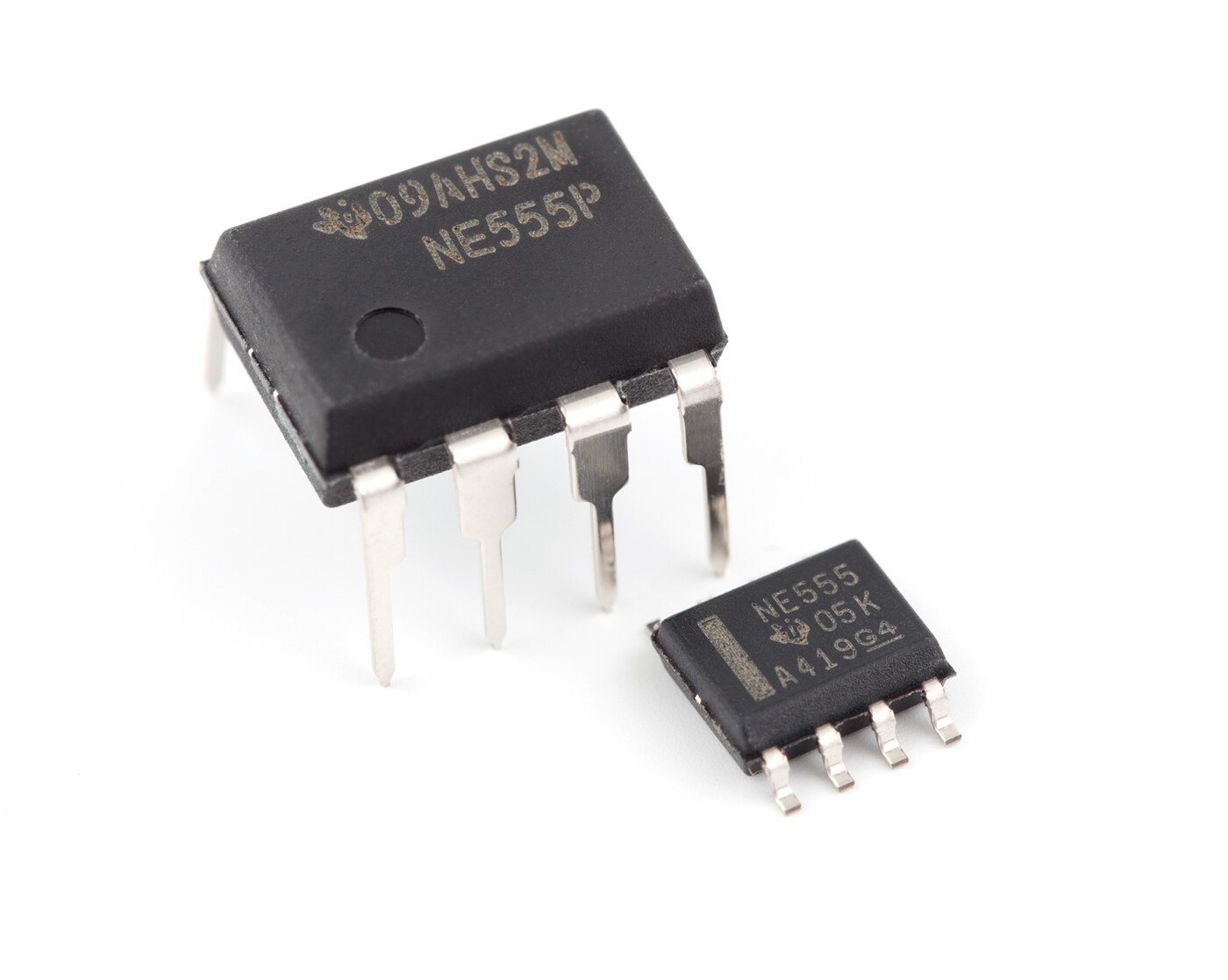
NE555 timer chip, sold in both families: DIP (through-hole, left) and SOIC (surface-mount, right). Same silicon, same function, two completely different packages. Photo: Swift.Hg, CC BY-SA 3.0.
Through-Hole: What You Start Exploring With🔗
-
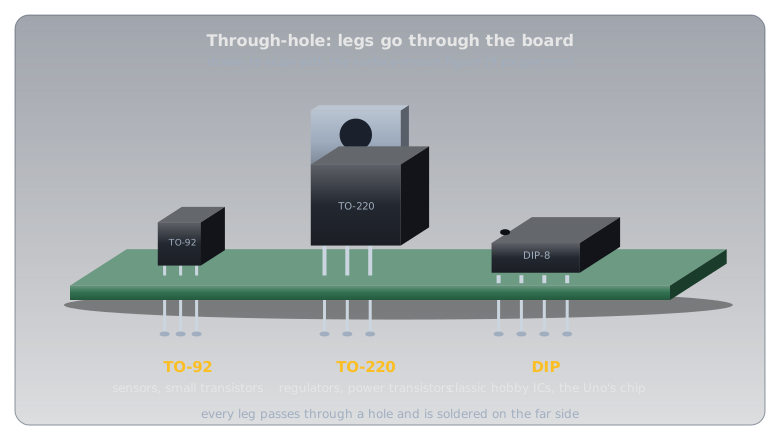
TO-92
A small black or clear half-cylinder with a flat face and three legs in a single row.
Common uses: small transistors, and simple analog ICs like the
MCP9700Atemperature sensor.Seen on this site: Temperature Sensors.
-
TO-220
A larger plastic body with a metal tab (for bolting to a heatsink) and three thick legs.
Common uses: voltage regulators and power transistors: anything handling enough current to generate real heat.
On this site: the
7805andLM317in Voltage Regulators, whose heat is the reason for the tab. -
DIP (Dual In-line Package)
A black rectangular body with two parallel rows of legs bent at right angles, one row per side.
Common uses: the classic hobbyist IC shape: logic chips, op-amps, and the Arduino Uno's
ATmega328P.Seen on this site: every Arduino photo, since the Uno's main chip is DIP.
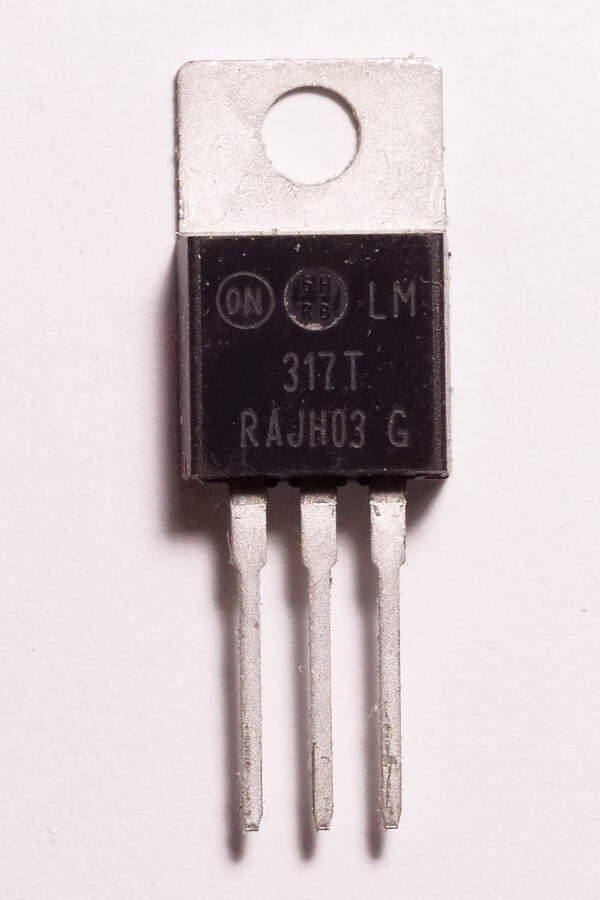
LM317 voltage regulator in TO-220: the tab at the top is bare metal, meant to bolt directly to a heatsink. Photo: Retired electrician, public domain (CC0)._01.jpg)
Surface-Mount: What's Inside Nearly Everything Else🔗
-
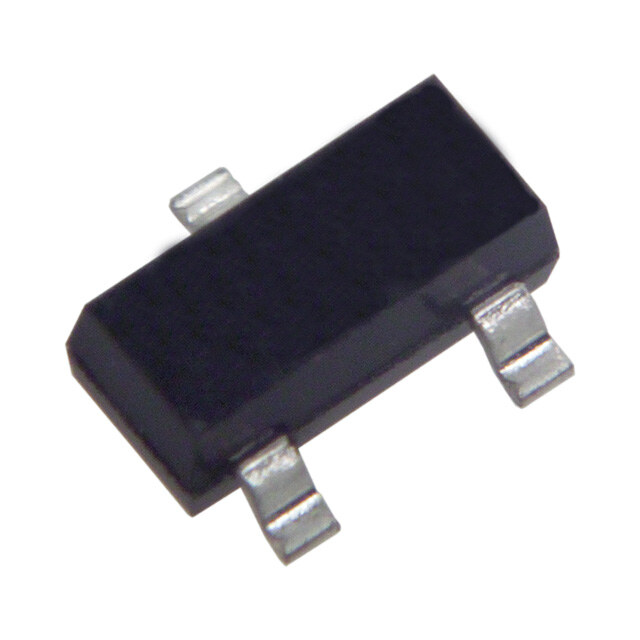
SOT-23
A few millimetres long, with 3 to 6 short legs splayed out from a small rectangular body.
Common uses: the SMD equivalent of TO-92: small transistors, tiny regulators.
-
SOIC / QFN / TQFP
A family of IC packages ranging from a small rectangle with legs down both long sides (SOIC) to a flat square with legs on all four edges (TQFP) or no visible legs at all (QFN).
Common uses: almost every IC in a modern phone, laptop, or commercial product.
Seen on this site: the SOIC half of the NE555 photo above.
-
0805 / 0603 chip components
No legs: just a tiny rectangular block with two metal end-caps. The numbers are the size in hundredths of an inch (0805 = 0.08″ × 0.05″).
Common uses: resistors and capacitors on virtually every modern circuit board; the SMD version of the banded resistor.

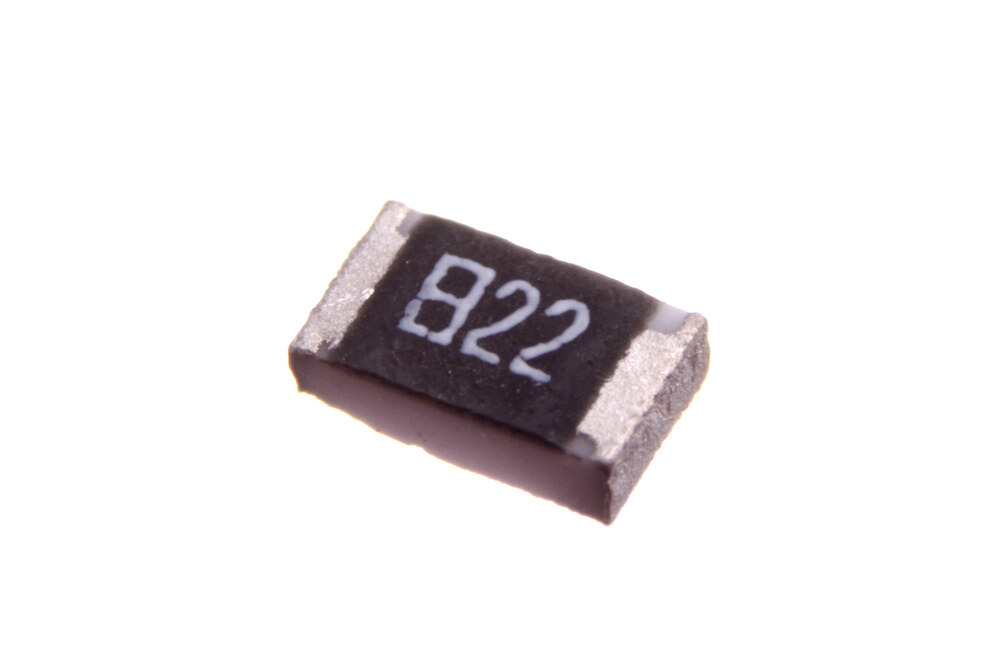
822 is the colour code in digits (8, 2, then two zeros), so 8,200 Ω or 8.2 kΩ; see [Resistor Color Codes](resistor_color_codes.md). Photo: oomlout, CC BY-SA 2.0.
Electrostatic discharge (ESD) can kill a bare IC
Static electricity from your own body can silently damage an integrated circuit, through-hole or surface-mount, before it's ever powered. It's unlikely on a casual breadboard project, but anyone handling bare ICs regularly should use an anti-static wrist strap or mat, and store spare chips in anti-static foam or their original packaging rather than a loose parts bin.
Why Package Choice Isn't Random🔗
A manufacturer's choice of package is a trade-off between size, heat handling, and how the part gets assembled:
- Smaller usually wins for SMD: less board space, lower cost at volume, and it's what automated pick-and-place assembly machines are built around.
- Through-hole survives more mechanical stress: a leg soldered through a board is harder to rip off than a pad on its surface, which is why connectors and large components often stay through-hole even in otherwise all-SMD designs.
- Heat dictates the biggest packages: TO-220's metal tab and QFN's exposed thermal pad both exist to move heat out of the part faster than tiny legs could.
The one trade-off that matters most for where you are right now: through-hole is what a breadboard can hold, full stop. That's why every part on this site so far (the resistors, the LEDs, the MCP9700A, the Uno's ATmega328P) is through-hole. SMD parts aren't more advanced; they simply don't fit the one piece of prototyping equipment this site relies on. Working with SMD means either soldering directly (a finer-tipped iron and steadier hands than through-hole demands) or using a breakout board that adapts its pads back out to breadboard-friendly pins.
Reading a Package Off a Datasheet or a Parts Listing🔗
Package is one of the first things listed for any component: on a datasheet's cover page (both the MCP9700A's and the ATmega328P's show it), and as a filterable column, usually "Package" or "Package/Case," on any parts distributor's site. Check it before ordering. The electrical specs of a through-hole and an SMD version of the same chip can be identical, and the most common ordering mistake is a part that arrives too small to plug into anything.
Practice🔗
1. Identifying by description
A friend describes a part as "a tiny black square, no visible legs, with metal pads only on the underside." Through-hole or surface-mount, and roughly which package family?
Solution
Surface-mount: no legs at all rules out every through-hole family. "Tiny black square with pads underneath" is a good description of a QFN package.
2. Breadboard compatibility
You want to prototype a circuit using a chip that's only sold in a SOIC package. What are your options?
Solution
Either solder it directly onto a custom or perfboard circuit (no breadboard), or buy a breakout board: a small adapter printed circuit board (PCB) with the SOIC chip already soldered on and its pads broken back out to a row of breadboard-friendly through-hole pins.
3. Why not always SMD
If SMD is smaller and cheaper at volume, why does the ATmega328P on an Arduino Uno ship in the bulkier DIP package instead?
Solution
The Uno is a hobbyist and prototyping board, and DIP is what a breadboard and a socket can hold. The Uno even sockets its chip, so it can be pulled out and reused in a separate project. Arduino sells other boards using the same silicon in SMD packages for production use, where board space and cost matter more than breadboard compatibility.
Quick Recap🔗
-
Package ≠ Function
What a part does and how it's physically built are separate decisions. Unrelated parts (a sensor, a transistor) can share the exact same package.
-
Two Families
Through-hole (long legs, through the board) and surface-mount (flat pads, on top of the board): the split that decides breadboard compatibility.
-
This Site Has Been All Through-Hole
Every part used hands-on so far is through-hole, because that's the only family a breadboard can hold.
-
Package Is a Datasheet Field
Listed on every datasheet cover page and distributor listing. Check it before ordering: electrical specs can be identical across packages that aren't interchangeable.
What's Next🔗
Every component from here on has a package worth a glance before you buy or wire it. Reading an Analog Sensor puts the MCP9700A's TO-92 package to work.
Further Reading🔗
Related Articles
- Temperature Sensors — the
MCP9700A's TO-92 package, in context - Resistor Color Codes — the through-hole resistor body every band-reading example in this article assumes
- What Is an Arduino? — the
ATmega328P's DIP package on the board itself