Breadboards🔗
Practical Tools
This article is part of the Practical Tools section: foundational reading before building your first circuit. If voltage, current, and resistance are new to you, start with What Is Electricity?.
A new circuit rarely works on the first try. Without a breadboard, testing it means soldering components together, and solder is semi-permanent: get a connection wrong or choose the wrong resistor, and everything has to be desoldered to try again. It's slow, it stresses components, and it discourages experimenting.
A breadboard removes all of that. Push components into holes, connect them with jumper wires, and the circuit works, with no heat and no commitment. Pull everything out and the board resets. Every circuit on this site starts on one.
A full-size 830-point breadboard costs $5–15 and will last years. It's the first thing to buy alongside any microcontroller kit.
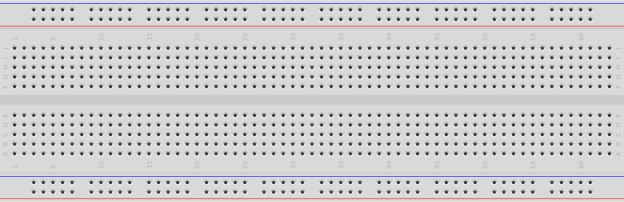
A full-size breadboard. Partial image: Giacomo Alessandroni, CC BY-SA 4.0.
How the Holes Connect🔗
Look at the component area in the image: the dense grid of holes between the power rails. It's divided into a left half (columns a through e) and a right half (columns f through j), separated by the channel running down the middle. Rows are numbered starting from 1.
The internal connection pattern:
  + -       a    b    c    d    e       f    g    h    i    j    - +
  o o   1  [o]--[o]--[o]--[o]--[o]  |  [o]--[o]--[o]--[o]--[o]   o o
  o o   2  [o]--[o]--[o]--[o]--[o]  |  [o]--[o]--[o]--[o]--[o]   o o
  o o   3  [o]--[o]--[o]--[o]--[o]  |  [o]--[o]--[o]--[o]--[o]   o o
-- marks connected holes. | is the centre gap, where nothing connects.
Inside the board, each row of five holds a metal clip. Anything inserted into a5, b5, c5, d5, or e5 touches the same clip, so they're all one electrical node. f5 through j5 are a separate clip on the other side of the gap.
The center gap is designed for components that intentionally span it. Integrated circuits (ICs), small chips with a row of pins on each side, are the most common example: one row lands in columns a–e, the other in columns f–j, keeping both sides electrically separate. Tactile switches are designed the same way. So the rule is to know whether a component is meant to span the gap.
Power Rails🔗
The red and blue strips along each long edge are the power rails. Unlike the component rows, they run the length of the board:
+rail (red stripe): the supply voltage, whether 3.3V, 5V, or whatever the circuit needs−rail (blue stripe): ground, 0V reference
Connect power once to the rails, then use short jumper wires to bring it into the component area wherever you need it.
The Rail Break
Many breadboards, especially full-size 830-point boards, have a break in the middle of each power rail, often marked by a gap in the red and blue lines. The two halves are not connected. A multimeter in continuity mode settles it: probe from one end of the + rail to the other, and no beep means a break (Open Circuits, Short Circuits, and Fuses explains the continuity test).
If your circuit spans the full board, bridge the gap with a short jumper. Miss this and that half of the rail won't have power, and nothing connected to it will work.
A Circuit on a Breadboard🔗
Here's a real circuit on a breadboard: an Arduino powering components through the power rails, with jumper wires routing signals into the component area. This is the parallel switch circuit from Series and Parallel Circuits.
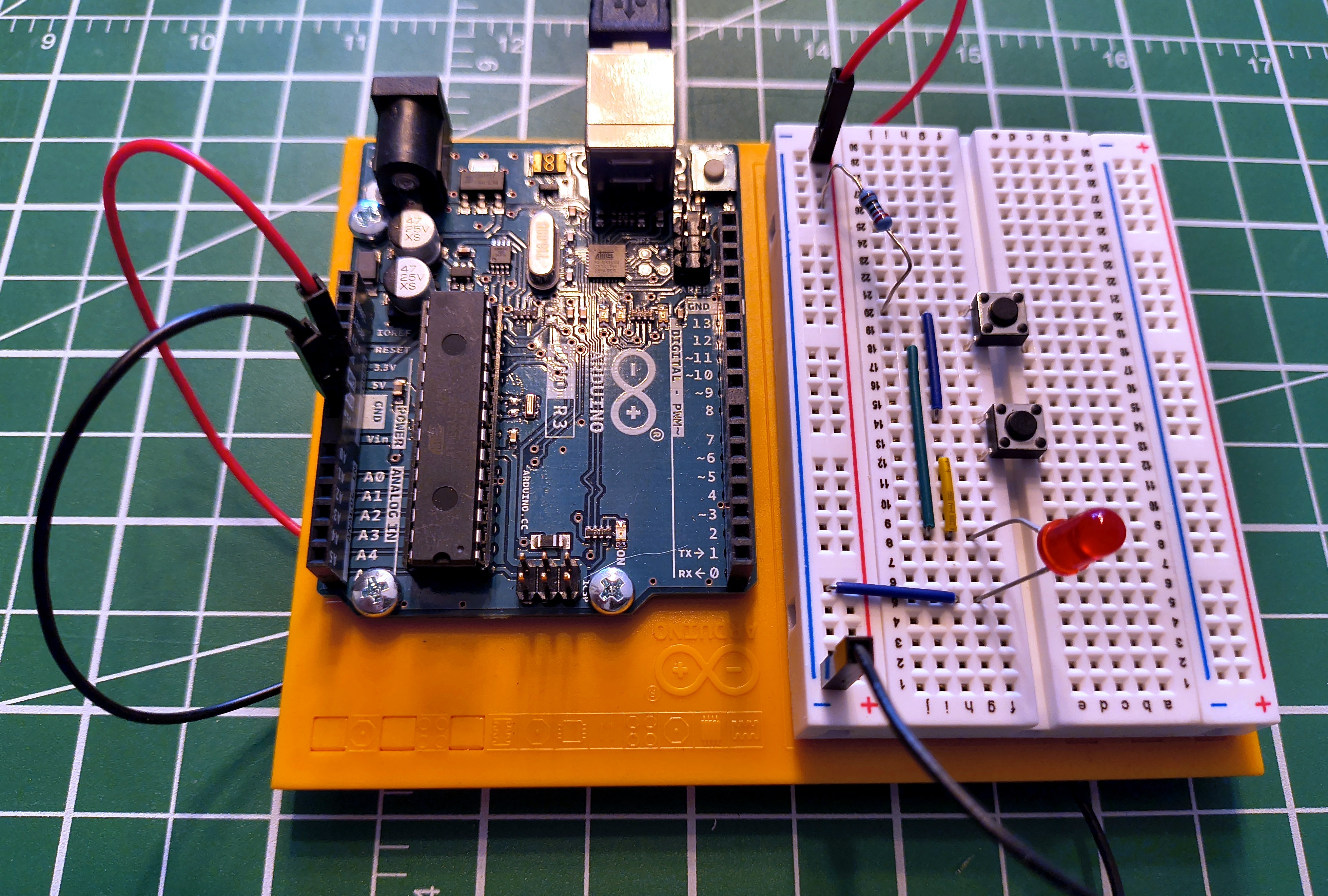
Notice the jumper wires carrying power and ground from the Arduino into the rails, and how each component occupies its own rows. Components sharing a row are electrically connected through the clip inside the board, with no wires needed between them.
Common Mistakes🔗
Bridging the center gap with a component
There's no connection across the channel. ICs and tactile switches are designed to span it; a resistor or LED usually isn't. An LED with one leg on each side lands in two separate nodes, so it isn't connected to anything else in either row the way you meant.
Off-by-one row
Row 10 and row 11 look identical. Miscounting by one row creates a broken circuit or an accidental short. Count carefully. On large circuits, different-coloured jumper wires help track what connects to what.
Ignoring the rail break
The most common reason a circuit works on one half of the board but not the other. Test your rails once in continuity mode before trusting them.
Partially seated components
A leg pushed in at an angle may not be making contact with the internal clip. Push straight down until it stops. Intermittent connections, working when you press on them and failing when you don't, are almost always a seating problem.
Running out of row space
Each row has five holes. When a row fills up, bridge to an adjacent empty row with a short jumper. Don't force two legs into one hole: it spreads the clip and damages the board permanently.
Practice🔗
Which holes are connected?
On a standard breadboard, which of these pairs share an electrical connection?
a5ande5a5anda6f5andj5a5andf5
Solution
- ✅
a5ande5: same row, same side of the gap - ❌
a5anda6: same column letter, different rows; columns don't connect - ✅
f5andj5: same row, same side of the gap - ❌
a5andf5: same row number, opposite sides of the centre gap
Find the mistake
A circuit isn't working. Tracing the wiring: the LED's anode is in e10, its cathode is in f10, and a resistor runs from a10 to the + rail. What's wrong?
Solution
The LED straddles the center gap. e10 and f10 are on opposite sides, and the gap between columns e and f breaks the row. Both LED legs need to land on the same side of the gap. Move the LED so both legs are in a10–e10 or f10–j10, then connect to the other side with a jumper if the circuit requires it.
Rail break diagnosis
Components on one half of your board work; the other half is dead. Power and ground are confirmed good on the working side. What's the most likely cause, and how do you fix it?
Solution
The power rail break. Many full-size breadboards have a gap midway along each rail, and the two halves are not connected. Check continuity along both the + and − rails with a multimeter in continuity mode. If either doesn't beep end-to-end, bridge the gap with a short jumper wire connecting the two halves.
Quick Recap🔗
-
Component Rows
Holes
a–ein a row are connected. Holesf–jin the same row are a separate node. The center gap separates the two halves. -
Power Rails
Red
+and blue−strips run the length of the board. Watch for a break in the middle, and bridge it with a jumper if your circuit spans both halves. -
Center Gap
Deliberate: it's there for components designed to span it, like DIP-package ICs and tactile switches. The question is whether your component is meant to bridge it.
-
No Commitment
Pull everything out and start over. Breadboards are for prototyping. Once a circuit works, move to something permanent.
What's Next🔗
The breadboard appears in every circuit on this site. The next step is putting it to work: Series and Parallel Circuits builds two wiring patterns on this exact board, and explains why the difference matters for every circuit you'll design.
Further Reading🔗
Visual Guides
- How to Use a Breadboard — SparkFun — photos and diagrams showing the internal clip structure
- Breadboards for Beginners — Adafruit — wire management tips for keeping circuits readable as they grow
Related Articles
- What Is Electricity? — voltage, current, and resistance: the theory behind every circuit you'll build on a breadboard
- Series and Parallel Circuits — the two wiring configurations demonstrated on the breadboard in this article
- How to Read a Schematic — read the circuit diagram first, then build it on the board
- Resistor Color Codes — identify the right resistor by its bands before it goes in the board
- What Is an Arduino? — the board pictured throughout this article, and what's actually on it
- Digital Pins — the button-and-LED circuit this board is built for, and what a microcontroller does with it
- arduino-cli — once the circuit is built, compile and upload the code that brings it to life